Displaying a new line in Vue without v-html and line break tags
The task was simple: display a small title on two lines. Something like this:
First Second
Third
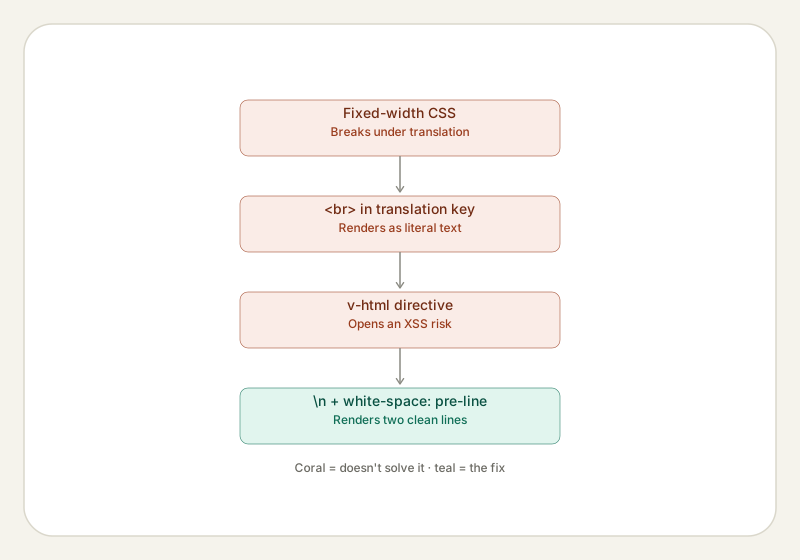
Applying a CSS width restriction to force the text to automatically go on a new line is not a catch-all solution. What happens if that title is localised and for other languages the width must be adjusted? Will you add a CSS exception using the :lang() selector? Of course not, it would be madness.
For a web developer, the basic instinct is to use a line break, the <br> tag. You'll just edit the translation key: "title": "First Second<br>Third". However, this opens a new can of worms. Your old <p>{{ translate('title') }}</p> will now render an ugly First Second<br>Third message. No new line anywhere in sight! (I mean, there is one if you know what "<br>" means but that's not what we need).
Another basic instinct, for a Vue developer facing raw HTML tags, is to reach for the v-html directive and convert the old <p>{{ translate('title') }}</p> to a <p v-html="translate('title')"></p>. Close, but no cigar! This is a somewhat bad practice, leaving you open (in theory) to XSS attacks. Say someone somehow gains access to the translation objects and inserts there all sorts of nasty things, not just a harmless line break tag.
The safest solution for such headaches is to reach for CSS. First, inside the translation key swap the <br> for a newline character: "title": "First Second\nThird". You keep the standard interpolation of <p>{{ translate('title') }}</p> but also apply the following style to it: white-space: pre-line
The quick and dirty version would be <p style="white-space: pre-line;">{{ translate('title') }}</p> but a smart developer would convert this into a small utility class (and if you need to have it spelled out how to do it... then you're not a smart developer, ha!)